
Inspect and retry a webhook
Find a webhook that failed, fix the cause, and send it again.
Replay sends a stored request through its routes again, and Retry on a delivery sends that delivery to your app again. This guide makes a webhook fail in three ways, then fixes each one and sends the webhook again.
Prerequisites
Section titled “Prerequisites”- The Docs demo route from the quickstart.
- Your app answering
POST /webhookson port 3000 with a2xxstatus. - The CLI forwarding to your app:
hookspot listen --forward-to http://localhost:3000Replay a rejected request
Section titled “Replay a rejected request”Hookspot rejects a request when no route delivers it. Pause the route to see this, then replay the request.
- Open Routes and click the check mark on the line from Docs demo to
/webhooks. - Click Pause. Docs demo shows an alert icon, whose tooltip reads Requests to this URL are saved but not delivered anywhere.
- Press
tin the CLI to send a test request. Your app gets nothing. - Open Requests and click Needs attention. The new request is Rejected with No route.
- Open Routes, click the paused line and click Resume.
- In Requests, select the rejected request and click Replay.
The request becomes Delivered, and your app gets it. It keeps its ID, so no new request appears.
If you pause the source instead, its requests are Rejected with Source disabled. Click Resume source on the source’s page, then replay them the same way.
Retry an offline delivery
Section titled “Retry an offline delivery”A webhook that arrives while the CLI is off gets a delivery with no attempt. The delivery waits until you retry it.
- Press
qto stop the CLI. - Open Overview and click Send test request.
- Open Deliveries. A banner reads 1 delivery skipped: no CLI was listening.
- Select the new row. It is Skipped with CLI offline, and its
Attempts count is
0.
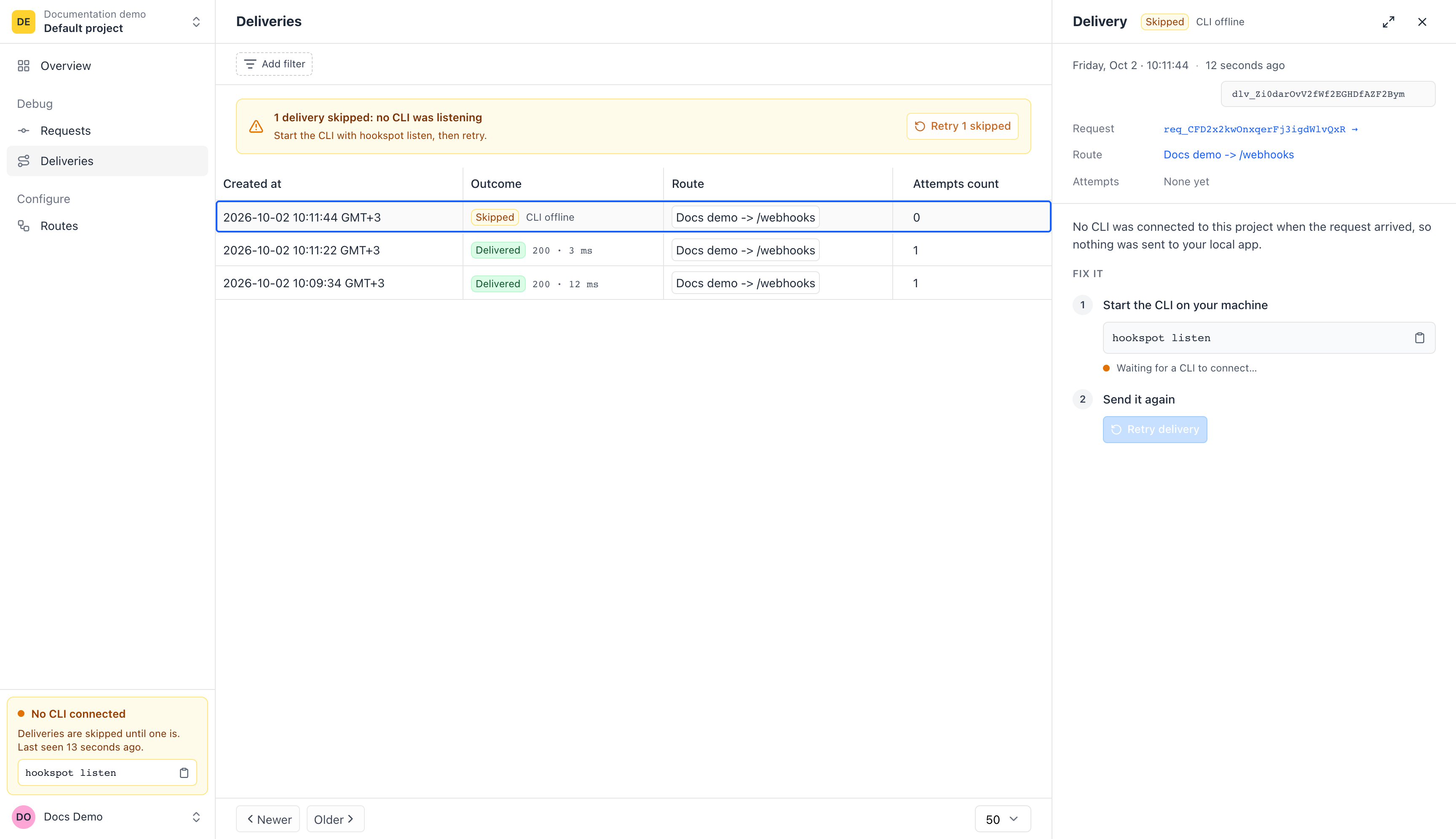
No CLI was connected when the request arrived, so the delivery has no attempt.
- Start the CLI again with
hookspot listen --forward-to http://localhost:3000. The Fix it panel shows CLI connected. - Click Retry delivery.
The delivery becomes Delivered, with one Manual retry attempt. Retry 1 skipped on the banner retries all skipped deliveries at once.
Watch a system retry
Section titled “Watch a system retry”Hookspot tries some failed deliveries again on its own. Retries lists which answers it retries and when.
- Stop your app, and keep the CLI running.
- Press
tin the CLI. The CLI showsrefused, and Hookspot records502. - Start your app again.
- Open Deliveries, select the new delivery and click the Open full page icon.
- Select Attempts.
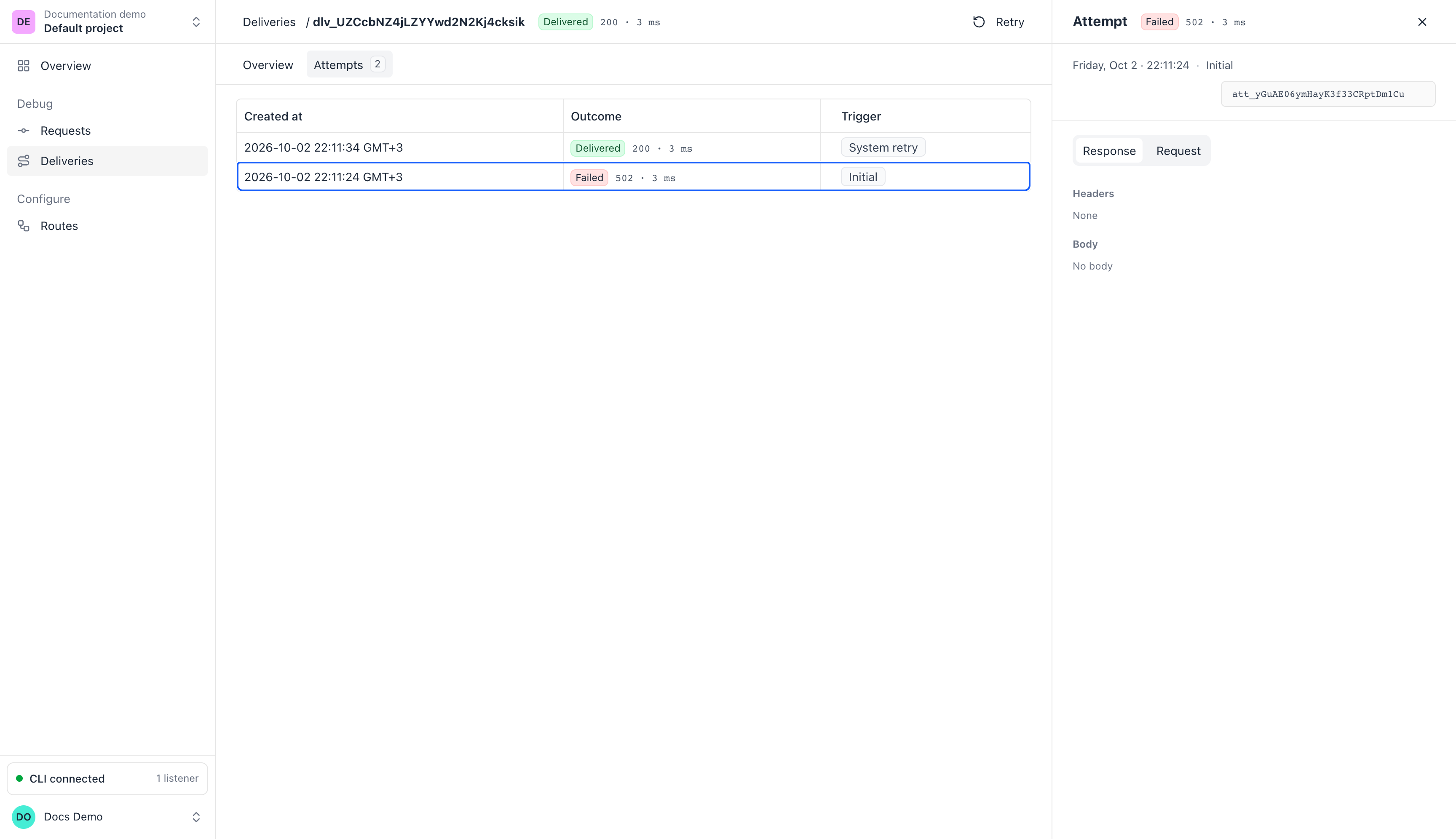
The newest attempt is first.
The Initial attempt is Failed with 502. The next attempt is a
System retry, and it is Delivered with 200.
If your app stays down for every attempt, the delivery stays Failed. Retry it as in the next section.
Retry a delivery
Section titled “Retry a delivery”Retry sends a delivery to your app again, whatever its outcome.
- Open Deliveries and select a delivery.
- Click Retry.
The Attempts tab gains a Manual retry row. Each retry sends the same webhook again, so your handler can get it more than once.
If the delivery is Skipped, its panel shows Retry delivery instead.
A retry uses the route’s current path. If you fix a wrong path, retry the failed deliveries and they go to the new one.
To send a request to your app again without a new attempt, press r in the
CLI. See Replay a request.