
Listen and forward
Watch webhooks arrive in your terminal and forward them to your app.
hookspot listen receives the webhooks of the CLI’s active project and
forwards each one to the app on your machine. This page covers the full-screen
view, test events, replays and the stream.
Forward to your app
Section titled “Forward to your app”Start the CLI with your app’s address:
hookspot listen --forward-to http://localhost:3000The CLI opens a full-screen view. The list holds each request, and the panel below it shows the selected one.
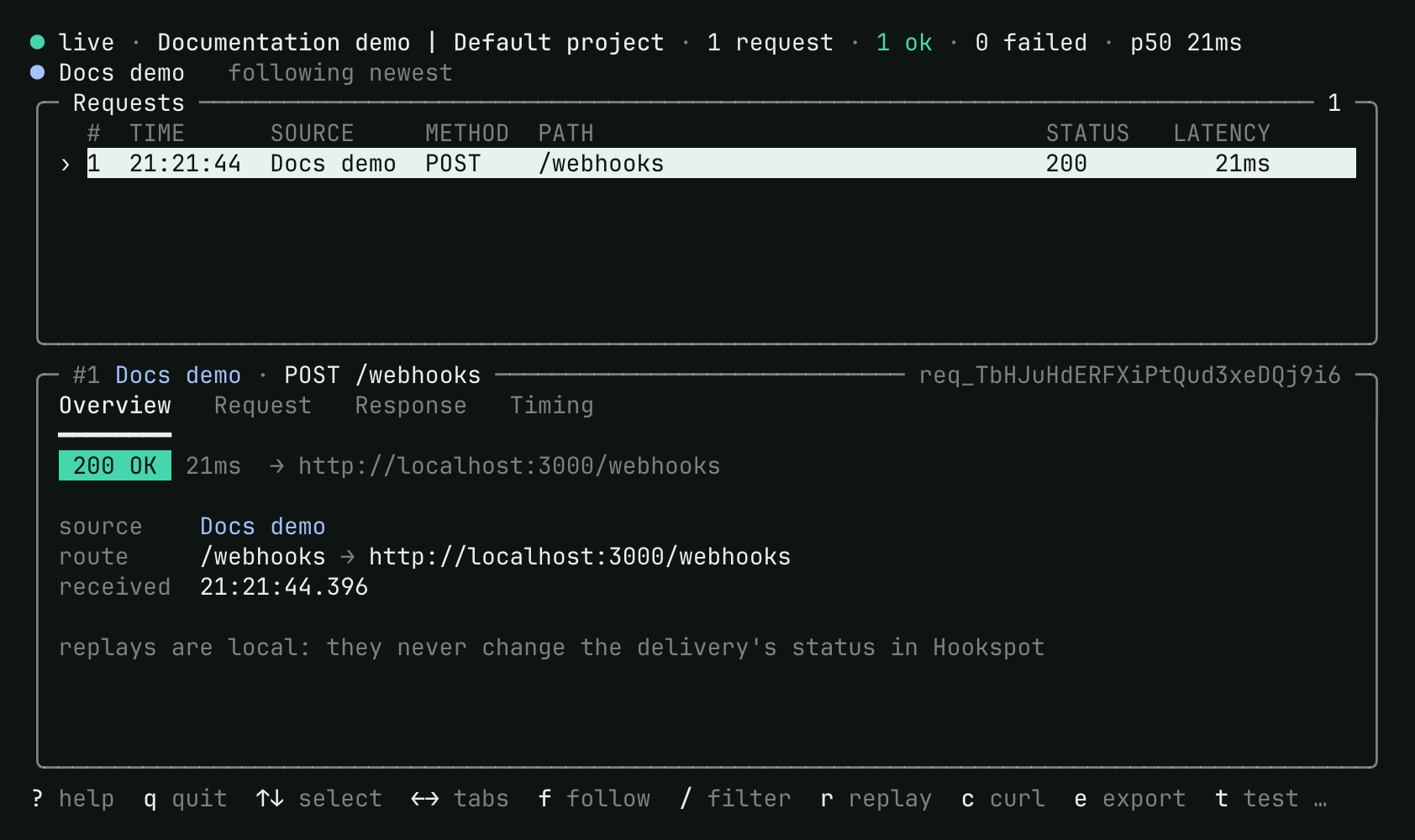
The key bar at the bottom names the main keys. Press ? for all of them.
The CLI adds the route’s path to the address in --forward-to. Keep that
address at your app’s root:
--forward-to |
Route path | Your app gets |
|---|---|---|
http://localhost:3000 |
/webhooks |
http://localhost:3000/webhooks |
http://localhost:3000/dev |
/webhooks |
http://localhost:3000/dev/webhooks |
--forward-to 3000 is short for http://localhost:3000. Your app gets the
webhook’s method, query, body and most of its headers. It has 30 seconds to
answer, and the CLI does not follow redirects.
Without a source name, the CLI listens to every source that has a route. To
listen to some sources only, name them exactly, such as
hookspot listen "Docs demo". Deliveries of the other sources are then
Skipped.
Without --forward-to, the CLI only shows each webhook and answers 200
itself.
Use the full-screen view
Section titled “Use the full-screen view”| Key | Action |
|---|---|
↑ ↓ |
Select a request. The list stops following the newest one. |
f |
Follow the newest request again. |
← → |
Switch the tabs: Overview, Request, Response and Timing. |
pgup pgdn |
Scroll the selected request. |
/ |
Filter the list. ↵ applies the filter, and esc clears it. |
r |
Replay the selected request to your app. |
w |
Wait for your app to start, then replay. |
t |
Send a test event. |
c |
Copy the request as a curl command. |
e |
Export the request to hookspot-fixtures/ in the current directory. |
s |
Open the Sources page: each source’s webhook URL, routes and counts. |
? |
Show every key. |
q |
Stop listening. |
A filter shows the requests that match all of its terms. Type status:error,
status:4xx or status:422 for statuses, and source: or path: with the
start of a name or path. Any other word matches the path and the event type.
c copies through your terminal, which must allow clipboard access.
Terminal.app does not, so use the stream’s c N there. It also prints the
command.
The printed command hides sensitive header values unless you pass
--show-sensitive-headers.
Send a test event
Section titled “Send a test event”Press t. The CLI posts a hookspot.test event to the source’s webhook URL,
and the request takes the same path as any webhook. The CLI marks its delivery
test and prints ✓ path works with how far the request got.
The test request shows under Requests in the app and counts toward the monthly limit.
Replay a request
Section titled “Replay a request”Select a request and press r. The CLI sends it to your app again and lists
the result as a new request. The stream prints a summary and what changed in
your app’s answer:
#2 ↻ #1 422 → 200 3ms → 1ms Docs demo · POST /webhooks 22:54:50.718 - "error": "missing customer_id" + "received": trueA replay stays in the CLI. Hookspot records no attempt, and the delivery keeps its outcome. To record a new attempt, retry the delivery.
Print a stream
Section titled “Print a stream”--stream prints each request as it arrives, with a › prompt at the bottom:
hookspot listen --stream --forward-to http://localhost:3000╭─ Listening in Documentation demo | Default project ─ 1 source • 1 route ─╮│ Docs demo https://<webhook-host>/RtXNHZuNw0VPjir0kS0v9L2sgE ││ → http://localhost:3000/webhooks │╰──────────────────────────────────────────────────────────────────────────╯No requests yet. Check the whole path with a test event:
t send a test event to Docs demo
or from anywhere: curl -X POST 'https://<webhook-host>/RtXNHZuNw0VPjir0kS0v9L2sgE' -H 'Content-Type: application/json' -d '{"type":"hookspot.test"}'╭─ #1 Docs demo · POST /webhooks ────────────────── test 22:54:46.831 ─╮│ 422 Unprocessable Entity 3ms → http://localhost:3000/webhooks ││ req_Rphx5soGtOEVflVEp9va46cCO4 │├─ request · application/json · 64 B ─────────────────────────────────────┤│ { ││ "type": "hookspot.test", ││ "sent_at": "2026-10-02T19:54:46.698976Z" ││ } │├─ response · application/json · 31 B ────────────────────────────────────┤│ { ││ "error": "missing customer_id" ││ } │╰─────────────────────────────────────────────────────────────────────────╯✓ path works: hookspot → this terminal → http://localhost:3000/webhooks#2 ↻ #1 422 → 200 3ms → 1ms Docs demo · POST /webhooks 22:54:50.718 - "error": "missing customer_id" + "received": true● live · Documentation demo | Default project · 1 request · 0 ok · 1 failed…› ↵ replay last · r N replay #N · t test event · ? help · ctrl-c quitHere t sent a test event, the app answered 422, and ↵ replayed it after
the fix. Type these commands at the prompt and press ↵:
| Command | Action |
|---|---|
↵ |
Replay the last request. |
r N |
Replay request #N. |
c N |
Copy request #N as a curl command, and print it. |
e N |
Export request #N to hookspot-fixtures/. |
t [SOURCE] |
Send a test event. |
? |
Show the commands. |
When its output goes to a pipe or a file, the CLI prints plain text instead, as in Use a CLI key in CI.
Stop listening
Section titled “Stop listening”Press q in the full-screen view, or Ctrl-C in any view. Webhooks that
arrive while the CLI is stopped are Skipped. Start the CLI again, then
retry them.
If the network drops, the CLI reconnects on its own. Back online, it
prints Reconnected with how long it was offline. Retry the deliveries from
that time in the app.