
Why a Webhook Returns 200 OK but Your App Still Fails
A webhook can return 200 OK even when your app fails, because the 200 comes from whichever service received the request first. When a sender posts to a Hookspot Webhook URL, Hookspot stores the request and answers {"status":"ok"} straight away. Your app gets a forwarded copy afterwards and answers that copy on its own, so the sender can see a 200 while your app returned a 500 or saved nothing.
A harder version to catch is a handler that sends 200 before doing the actual work. If that work fails afterwards, the delivery still shows as Delivered, and you only see the failure in your application logs. I built that handler to see it happen. Then I made the failure show up in Hookspot, watched Hookspot retry it, fixed the bug and retried by hand.
I did this on Windows 11 in Git Bash with Node.js v24.14.0, and the outputs below are pasted from my terminal.
The two answers
Every webhook that goes through Hookspot gets two answers. Hookspot returns ok to the sender, then forwards the request to your app. The app’s response appears in the dashboard’s Outcome column.
In my first tutorial the zero-total order made my handler return a 422. That one is easy to catch, because the app answers with an error and Hookspot marks the delivery Failed. Each of those deliveries has a single attempt and nothing after it, since resending the same request to the same code would give the same 422. The harder case is when the app answers 200 itself and the work fails anyway.
Prerequisites
You’ll need:
- The
hookspot-node-examplefolder from the first tutorial, withorder-created.json. - Node.js 22 or newer.
- The Hookspot CLI, logged in with
hookspot login. - Your route’s Webhook URL.
Open three terminals and go to the example folder in each one:
cd ~/OneDrive/Dokumenti/hookspot-work/hookspot-node-exampleThat’s my path, so use yours. Then save this order in the same folder as order-created-eur.json:
{ "type": "order.created", "data": { "id": "ord_test_eur", "total": 3900, "currency": "EUR" }}order-created.json is the USD order from the first tutorial, with the id ord_test_123.
Step 1: Run a handler that answers first
Save this as v1-silent.js:
const http = require('node:http');
const PORT = 3000;
// Stand-in for a database write. Only USD orders are supported so far.async function saveOrder(order) {  await new Promise((resolve) => setTimeout(resolve, 50));  if (order.currency !== 'USD') {    throw new Error(`unsupported currency ${order.currency}`);  }  console.log(`saved ${order.id} total=${order.total} ${order.currency}`);}
function sendJson(response, statusCode, value) {  response.writeHead(statusCode, { 'content-type': 'application/json' });  response.end(`${JSON.stringify(value)}\n`);}
async function handleWebhook(request, response) {  const url = new URL(request.url, 'http://localhost');  if (request.method !== 'POST' || url.pathname !== '/webhooks/orders') {    sendJson(response, 404, { error: 'not found' });    return;  }
  request.setEncoding('utf8');  let rawBody = '';  for await (const chunk of request) {    rawBody += chunk;  }
  let event;  try {    event = JSON.parse(rawBody);  } catch {    sendJson(response, 400, { error: 'invalid JSON' });    return;  }
  if (event?.type !== 'order.created' || typeof event.data?.id !== 'string') {    sendJson(response, 422, {      error: 'expected an order.created event with data.id',    });    return;  }
  // Answers first and saves afterwards.  // If the save fails, the sender never finds out.  sendJson(response, 200, { received: true });  saveOrder(event.data).catch((error) => {    console.error(`processing failed for ${event.data.id}: ${error.message}`);  });}
http.createServer(handleWebhook).listen(PORT, () => {  console.log(`Listening on http://localhost:${PORT}`);});
saveOrder stands in for a database write, and it only knows USD. The handler sends the 200 and then calls saveOrder without waiting for it. The .catch only prints the error.
The check before the answer is there because of a crash I hit while testing. Without it, a body with no data makes event.data.id throw inside the .catch, and that error stops the whole Node process. With the check, such a request gets a 422 and the server keeps running.
Start it in the first terminal, then start the CLI in the second:
node v1-silent.jshookspot listen --forward-to http://localhost:3000In the third terminal, load your Webhook URL. I keep mine in a file outside the project, so it doesn’t end up in my shell history:
export WEBHOOK_URL="$(cat ../secret-url.txt)"If you followed the first tutorial, export WEBHOOK_URL='paste your webhook URL here' works too.
Step 2: Send a USD order and a EUR order
Send the USD order first:
curl --request POST \ --header 'Content-Type: application/json' \ --data-binary @order-created.json \ "$WEBHOOK_URL"The receiver printed saved ord_test_123 total=4200 USD. Then I sent the EUR order:
curl --request POST \ --header 'Content-Type: application/json' \ --data-binary @order-created-eur.json \ "$WEBHOOK_URL"{"status":"ok","request_id":"req_uq5HQ8OLUMzC18D1NE0HxDrIGm"}curl got ok again, but the EUR order was never saved. The only trace is the error the receiver printed:
Listening on http://localhost:3000saved ord_test_123 total=4200 USDprocessing failed for ord_test_eur: unsupported currency EURStep 3: Check what Hookspot says
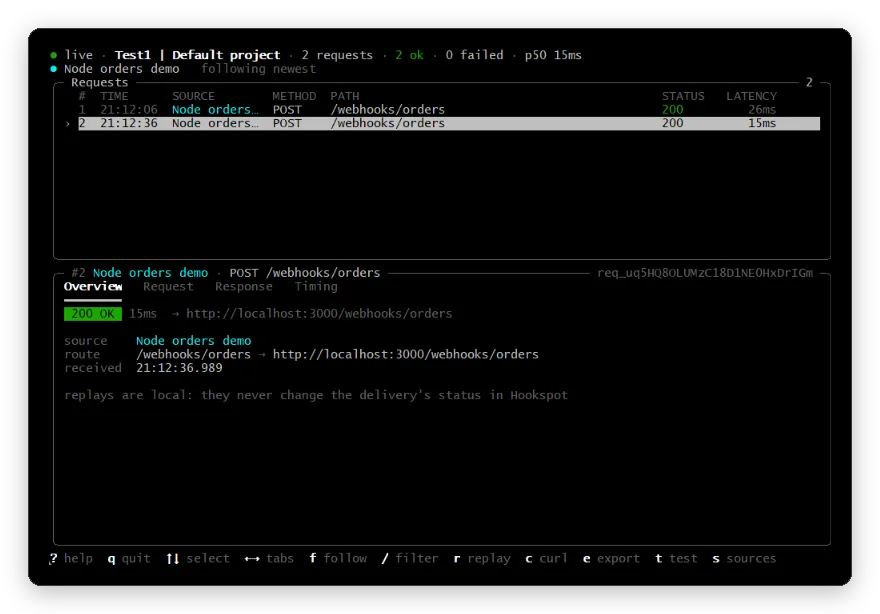
The CLI shows the EUR request as 200 OK:
The dashboard agrees. In Requests, the EUR order is Delivered with 200, and there’s no hint that the order wasn’t saved:
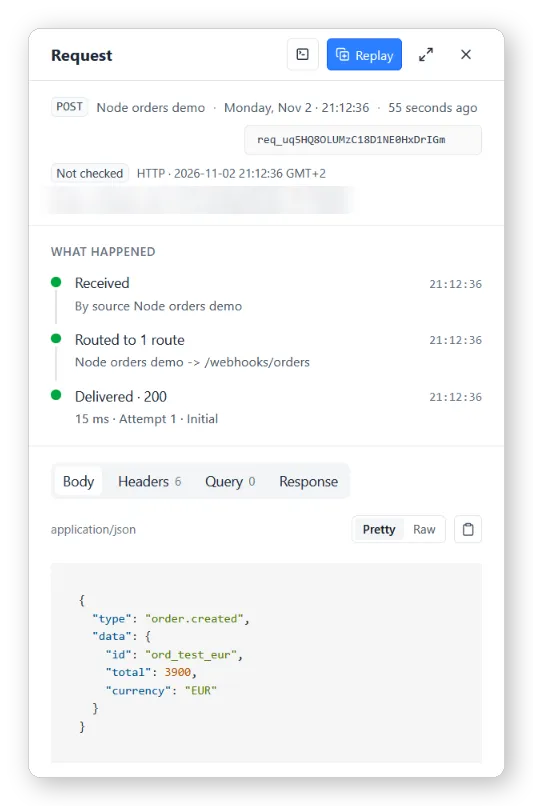
Hookspot reports this as Delivered because my app returned 200. It cannot see that the save failed afterwards.
Step 4: Answer with an error when the work fails
To make the failure visible, I waited for saveOrder before answering. Copy the file:
cp v1-silent.js v2-await.jsIn v2-await.js, replace the two // Answers first comment lines and the four lines under them with this:
try { await saveOrder(event.data); } catch (error) { console.error( `500 processing failed for ${event.data.id}: ${error.message}`, ); sendJson(response, 500, { error: 'processing failed' }); return; } sendJson(response, 200, { received: true, orderId: event.data.id });In the first terminal, stop the receiver with Ctrl+C and start the new one:
node v2-await.jsThen send the EUR order again with the same curl command. In the CLI, select the new request and press → until you reach the Response tab:
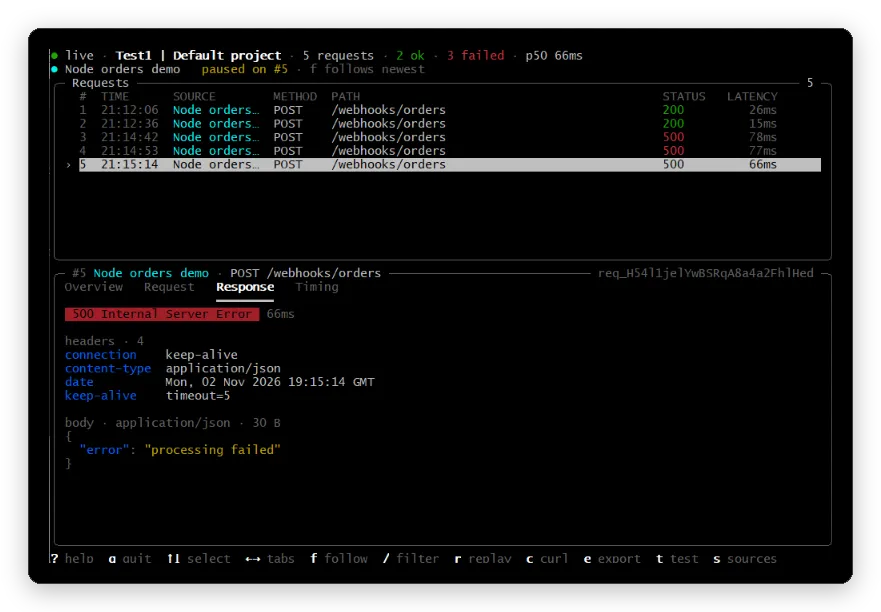
Now the failure is in Hookspot, with the body my app returned. The sender still got the same ok as before, because that answer comes from Hookspot and doesn’t depend on my app.
Step 5: Watch Hookspot retry
I didn’t touch anything after sending the order. The receiver’s terminal kept printing the same error:
Listening on http://localhost:3000500 processing failed for ord_test_eur: unsupported currency EUR500 processing failed for ord_test_eur: unsupported currency EUR500 processing failed for ord_test_eur: unsupported currency EUR500 processing failed for ord_test_eur: unsupported currency EUR500 processing failed for ord_test_eur: unsupported currency EURHookspot was sending the same request again. In Deliveries, the delivery shows Failed 500 with five attempts, the first one marked Initial and the rest System retry:
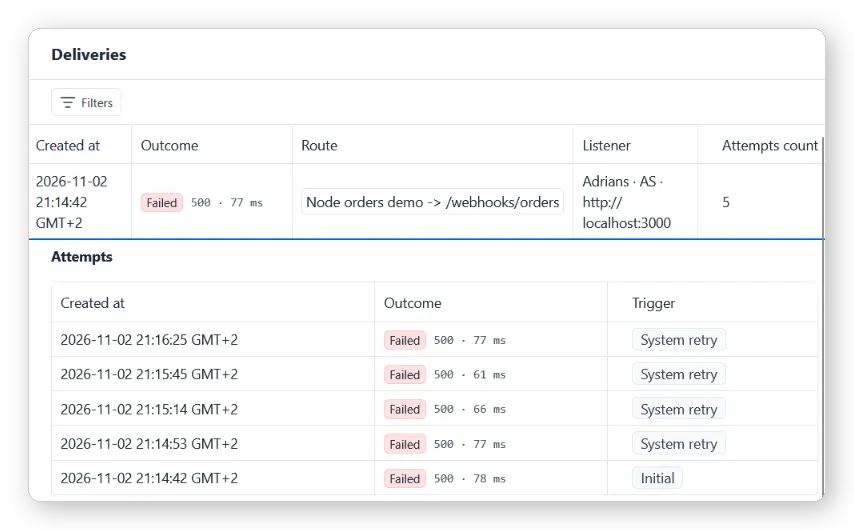
The retries came at 21:14:53, 21:15:14, 21:15:45 and 21:16:25, so the waits were 11, 21, 31 and 40 seconds. That’s almost the same spacing I saw in the offline article when my app was down. No sixth attempt came, which matches How Hookspot works: the wait grows before each retry, and Hookspot stops at five attempts.
This differs from the 422 earlier. A 500 can go away on its own, so Hookspot retries it. According to Hookspot’s docs, a 408, a 429, any 5xx and an unreachable app are retried, while other 4xx responses are not. In my case the cause was in the code, so five attempts changed nothing.
Step 6: Fix the cause and retry
The bug was that the handler only accepted USD, so I changed that check in saveOrder:
cp v2-await.js v3-eur.jsIn v3-eur.js, replace the currency check (and the comment above it, if you like):
if (!['USD', 'EUR'].includes(order.currency)) {Stop the receiver and start the new one:
node v3-eur.jsIn Deliveries, I selected the Failed 500 delivery and clicked Retry. The receiver printed:
Listening on http://localhost:3000saved ord_test_eur total=3900 EURThe same delivery now reads Delivered 200. It has six attempts, and the last one, at 21:17:28, has the trigger Manual retry:
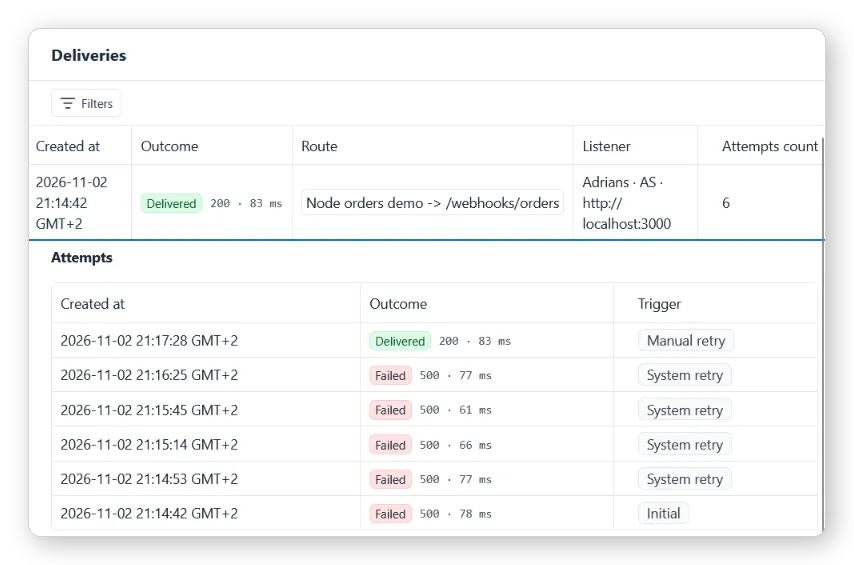
I had to click, because no automatic attempt was left by then.
Answer first or wait for the work
Waiting for saveOrder, as in Step 4, only works when the work is quick. Hookspot’s troubleshooting guide says the CLI stops waiting after 30 seconds and Hookspot records the delivery as a 502, even if your app finishes a moment later. For slow work, the handler should store the job somewhere safe, such as a queue or a database row, then answer 200. A background worker does the slow part, and its failures go to your own error log or retry logic.
Retries also have a cost. Hookspot’s inspect and retry guide warns that each retry sends the same webhook again, so your handler can receive it more than once. In my test the order had never been saved, so the retry was safe. If your handler saves half of something before it fails, a retry can create a duplicate, so check for the event or order id before writing.
Checking a webhook that returned 200
| What you see | What it tells you |
|---|---|
The sender’s response (ok) |
Hookspot stored the request |
| Outcome in Requests or Deliveries | What your app answered to Hookspot |
| Response tab in the CLI | The status and body your app returned |
| Attempts in Deliveries | How many times Hookspot tried, and why |
| Your app’s own logs | What happened after the answer was sent |
Next steps
If your app answers with a 422 or another 4xx, How to Test Webhooks Locally with Node.js shows how to find the cause. Turn a Captured Webhook into a Node.js Regression Test keeps the request as a test, and How to Recover Webhooks That Arrived While Your Laptop Was Off covers deliveries that were skipped or failed because your app was down. How to Test GitHub Webhooks Locally with Node.js shows the same split with GitHub, which reports 200 for a delivery the app rejected with 401.
FAQ
Why does my provider show success when nothing was saved?
The provider only sees the answer from the first service that received the webhook. If your handler answers 200 before the work is done, or an intermediate service answers for it, a later failure is invisible to the sender. Check the status your app returned and your own logs.
Does Hookspot retry a failed delivery?
It retries when your app answers 408, 429 or a 5xx, and when it can’t reach your app, up to five attempts in total. It doesn’t retry other 4xx responses, such as the 422 in my first tutorial. Retry those yourself after fixing the handler.
Can a retry run my handler twice?
Yes. A retry sends the same webhook again, so make the handler safe to run twice, for example by checking whether the order id is already saved.