
How to Test GitHub Webhooks Locally with Node.js
To test GitHub webhooks locally with Node.js, set a Hookspot Webhook URL as the Payload URL in your repository’s webhook settings, run the Hookspot CLI to forward each delivery to localhost, and check the X-Hub-Signature-256 header in your app with the same secret you gave GitHub. GitHub then sends real events to the app on your laptop, and every delivery is stored in Hookspot, so you can replay it after you change the code.
I set this up with a throwaway repository and a small receiver that logs new issues. GitHub’s ping arrived first, then a real issues.opened event. After that I started the receiver with the wrong secret to see what a failed signature check looks like. The part I didn’t expect came from GitHub, which showed a green check for a delivery my app had rejected with 401.
Everything ran on Windows 11 in Git Bash with Node.js v24.14.0, and the outputs below come from those runs. My first tutorial used made-up order events sent with curl. This one uses the same setup with events that come from GitHub.
Why GitHub can’t send webhooks to localhost
GitHub sends webhooks from its own servers, so the Payload URL has to be reachable from the internet. http://localhost:3000 only exists on your laptop. When I typed localhost:3000/webhooks/github into the Payload URL field, GitHub refused to save the webhook.
With Hookspot in the middle, a delivery takes the path below. The second step explains the green check you’ll see in Step 7.
- GitHub posts the event to your Hookspot Webhook URL.
- Hookspot stores the request and answers GitHub.
- The Hookspot CLI on your laptop forwards it to
http://localhost:3000/webhooks/github. - Hookspot records what your app answered.
Prerequisites
You’ll need:
- Node.js 22 or newer. Check with
node -v. - A Hookspot account. The Free plan is enough.
- The Hookspot CLI, installed with
npm install -g @hookspot/cliand logged in withhookspot login. The first tutorial shows the login step. - A GitHub repository where you have admin access, since only admins can manage its webhooks. I created a private one called
hookspot-webhook-test, so the test issues stay out of real projects. - Three terminals: the first for the receiver, the second for the Hookspot CLI and the third for everything else.
On Windows I used Git Bash, so the commands work as written. The
clipcommand in Step 5 is a Windows tool, and Git Bash can run it.
Step 1: Add a GitHub route in Hookspot
In the Hookspot dashboard, open Routes and click New source. I named mine GitHub issues demo and set Path in your local app to /webhooks/github. The route from my orders tutorial is still on the board, paused.
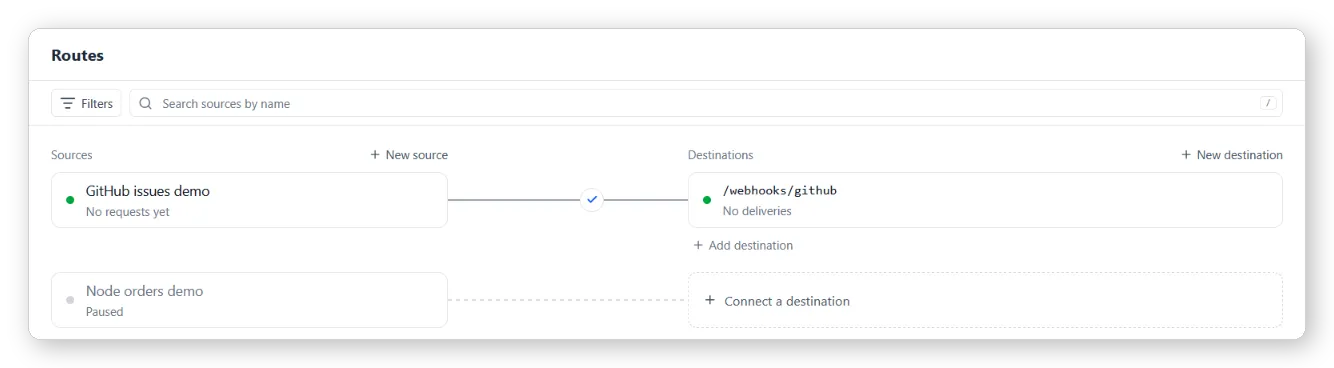
Copy the new route’s Webhook URL. It goes into GitHub in Step 5. Anyone who has this URL can send requests that end up in your app, so I blurred it in every screenshot here and keep it in a file outside the project, ../github-webhook-url.txt.
Step 2: Create a webhook secret
GitHub signs every delivery with a secret that you choose, and your app uses the same secret to check that the request really came from GitHub. Generate a random one with Node and save it outside the project folder, so it can’t end up in Git:
node -e "console.log(require('crypto').randomBytes(20).toString('hex'))" \ > ../github-secret.txtThat writes 40 random hex characters. You could also click Generate in the Hookspot route settings and copy the result into GitHub, but I wanted the secret in a file my shell could read.
Step 3: Write a receiver that checks the signature
GitHub puts the signature in the X-Hub-Signature-256 header. The value is sha256= followed by a hex HMAC-SHA256 of the request body, computed with your secret. The receiver computes the same value and compares the two.
Save this as receiver-github.js in the hookspot-node-example folder:
const http = require('node:http');const crypto = require('node:crypto');
const PORT = 3000;const SECRET = process.env.GITHUB_WEBHOOK_SECRET;
if (!SECRET) {  console.error('Set GITHUB_WEBHOOK_SECRET before starting the receiver.');  process.exit(1);}
function sendJson(response, statusCode, value) {  response.writeHead(statusCode, { 'content-type': 'application/json' });  response.end(`${JSON.stringify(value)}\n`);}
// GitHub signs the raw request body with HMAC-SHA256// and sends the result as "sha256=<hex>".function isValidSignature(rawBody, signatureHeader) {  if (    typeof signatureHeader !== 'string' ||    !signatureHeader.startsWith('sha256=')  ) {    return false;  }  const hmac = crypto.createHmac('sha256', SECRET).update(rawBody);  const expected = Buffer.from(`sha256=${hmac.digest('hex')}`);  const received = Buffer.from(signatureHeader);  return (    expected.length === received.length &&    crypto.timingSafeEqual(expected, received)  );}
async function handleWebhook(request, response) {  const url = new URL(request.url, 'http://localhost');  if (request.method !== 'POST' || url.pathname !== '/webhooks/github') {    sendJson(response, 404, { error: 'not found' });    return;  }
  // Keep the body as raw bytes.  // The signature is computed over exactly these bytes.  const chunks = [];  for await (const chunk of request) {    chunks.push(chunk);  }  const rawBody = Buffer.concat(chunks);
  if (!isValidSignature(rawBody, request.headers['x-hub-signature-256'])) {    console.log('401 invalid signature');    sendJson(response, 401, { error: 'invalid signature' });    return;  }
  const eventName = request.headers['x-github-event'];  const payload = JSON.parse(rawBody.toString('utf8'));
  if (eventName === 'ping') {    console.log(`200 ping: ${payload.zen}`);    sendJson(response, 200, { pong: true });    return;  }
  if (eventName === 'issues' && payload.action === 'opened') {    const { number, title, user } = payload.issue;    console.log(`200 issues.opened #${number} "${title}" by ${user.login}`);    sendJson(response, 200, { received: true, issue: number });    return;  }
  const action = payload.action ? `.${payload.action}` : '';  console.log(`200 ignored ${eventName}${action}`);  sendJson(response, 200, { ignored: true });}
http.createServer(handleWebhook).listen(PORT, () => {  console.log(`Listening on http://localhost:${PORT}`);});
GitHub signs the exact bytes it sent, so the body stays a Buffer until the check passes. Parse the JSON and stringify it again first, and the spacing or escaping can change enough to fail a valid delivery. The regression test tutorial keeps exported bodies as a Buffer for the same reason.
crypto.timingSafeEqual compares the signatures in constant time, which is what GitHub’s validation docs ask for instead of ==. It throws an error when the two buffers have different lengths, so the length check runs first. A request with no signature header, or with only the older X-Hub-Signature (SHA-1, which GitHub still sends for backward compatibility), gets a 401 as well.
Only the ping and issues.opened events get logged in detail. Anything else gets a 200 and an ignored line, so GitHub doesn’t count events you subscribed to by accident as failures.
Before pointing GitHub at it, I checked the HMAC call against the example in GitHub’s docs. With their secret It's a Secret to Everybody and the payload Hello, World!, Node gave the same signature the docs list:
node -e "const crypto = require('node:crypto');const hmac = crypto.createHmac('sha256', \"It's a Secret to Everybody\");console.log('sha256=' + hmac.update('Hello, World!').digest('hex'));"sha256=757107ea0eb2509fc211221cce984b8a37570b6d7586c22c46f4379c8b043e17Step 4: Start the receiver and the CLI first
GitHub sends a ping event as soon as you save a new webhook. If the CLI isn’t running at that moment, Hookspot stores the ping as Skipped, the case I covered in How to recover webhooks that arrived while your laptop was off. So start both before you touch GitHub.
In the first terminal, load the secret and start the receiver:
cd ~/OneDrive/Dokumenti/hookspot-work/hookspot-node-exampleexport GITHUB_WEBHOOK_SECRET="$(cat ../github-secret.txt)"node receiver-github.jsListening on http://localhost:3000That’s my path, so use yours. Reading the secret with $(cat ...) keeps its value off the screen and out of your shell history.
In the second terminal, start the CLI:
hookspot listen --forward-to http://localhost:3000As in the first tutorial, the CLI adds the route’s path for you, so requests go to http://localhost:3000/webhooks/github. Leave both terminals running from here on.
Step 5: Add the webhook in GitHub
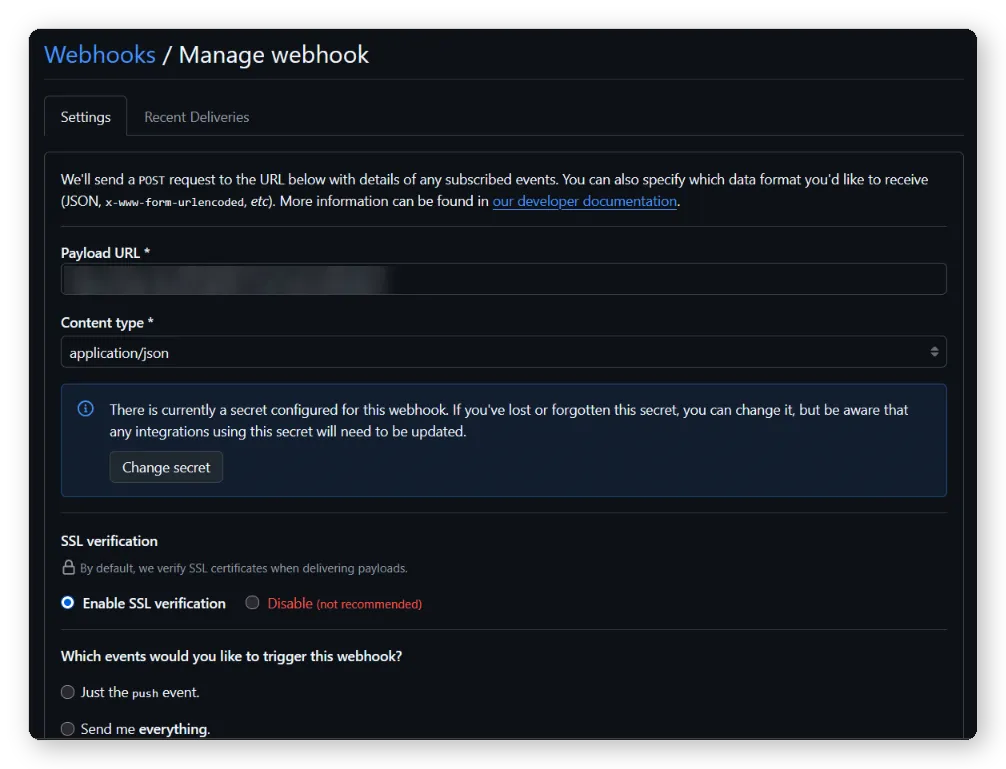
In your repository, open Settings, click Webhooks in the sidebar and then Add webhook. Fill in the form:
- Paste your Hookspot Webhook URL into Payload URL. It starts with
https://hkspt.dev/. - Set Content type to
application/json. The receiver parses the body as JSON, and the other option sends the payload as a form field. - Paste the contents of
../github-secret.txtinto Secret. In Git Bash,cat ../github-secret.txt | clipcopies it to the clipboard without printing it. On macOS, usepbcopyinstead ofclip. - Leave SSL verification on Enable SSL verification.
- Under Which events would you like to trigger this webhook?, choose Let me select individual events, tick Issues and untick Pushes.
- Keep Active ticked and click Add webhook.
After saving, the webhook’s page shows the settings again. GitHub never displays the secret after that, only a Change secret button:
The ping arrived right away, and the receiver printed the random line GitHub puts in every ping:
200 ping: Keep it logically awesome.In the CLI, the ping was request #1, forwarded to localhost:3000/webhooks/github and answered 200 OK in 18 ms. Back in GitHub, the webhook list showed a green check and “Last delivery was successful.”
Step 6: Open an issue
In the repository’s Issues tab, click New issue. I used the title Test webhook from GitHub, left the description empty and submitted it. The receiver logged it a moment later:
200 issues.opened #1 "Test webhook from GitHub" by your-usernameTo see what GitHub sent, select the request in the CLI and press → to open the Request tab. The headers your app cares about are x-github-event, which says issues, and x-hub-signature-256. GitHub also sends x-github-delivery, a unique ID for each delivery, and the SHA-1 x-hub-signature:
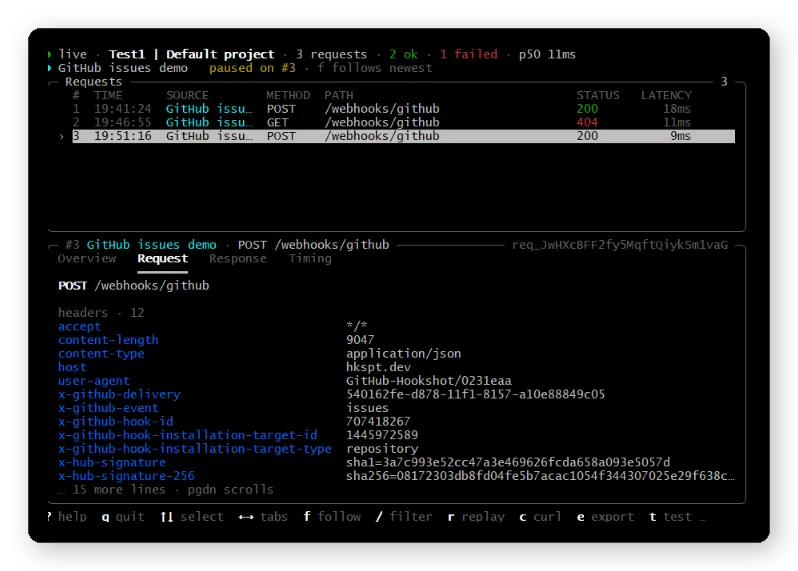
The content-length header shows how big these payloads get. An issue with a title and no description came in at 9,047 bytes, because GitHub includes full objects for the issue, the repository and the user who opened it.
Step 7: Break the secret on purpose
A wrong secret is a common setup mistake, so I wanted to see how it looks. In the first terminal, stop the receiver with Ctrl+C and start it with a different secret for this one run:
GITHUB_WEBHOOK_SECRET=wrong-secret node receiver-github.jsThe variable set in front of the command only applies to that process, so the correct secret you exported earlier stays in the terminal. Then I opened a second issue, Second test issue, and the receiver rejected it:
Listening on http://localhost:3000401 invalid signatureIn the Hookspot dashboard, Deliveries shows it as Failed 401 after a single attempt, with the receiver’s {"error": "invalid signature"} as the response body:
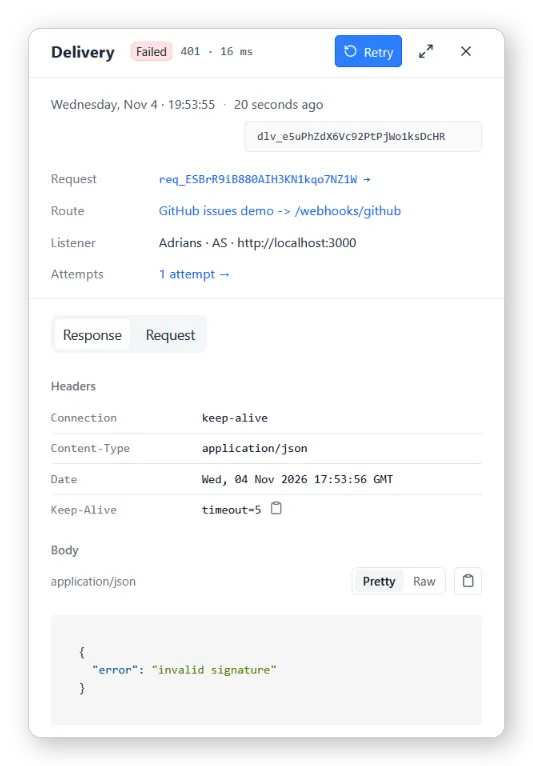
I waited a few minutes and no retry came. The retry rules in How Hookspot works explain why: Hookspot retries a 408, a 429, a 5xx or an unreachable app, and leaves other 4xx responses alone, because sending the same request to the same code would fail the same way.
GitHub’s view of the same delivery is different. Open the webhook from Settings > Webhooks and switch to the Recent Deliveries tab. The delivery for issue #2 has a green check and Response 200, completed in 0.5 seconds:
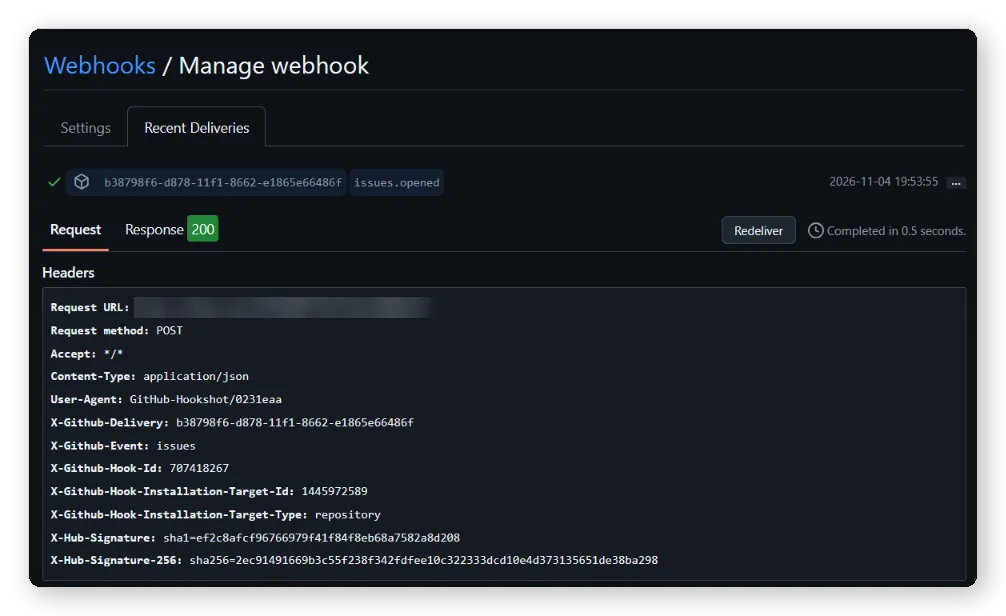
That 200 was Hookspot’s. It stored the event and answered GitHub right away, and my app’s 401 went back to Hookspot afterwards. I wrote about these two separate answers in Why a webhook returns 200 OK but your app still fails. So while you test this way, Recent Deliveries only tells you that the event arrived, and your app’s answer is in the dashboard and the CLI.
Step 8: Fix the secret and replay the delivery
I stopped the receiver in the first terminal and ran node receiver-github.js again without the override. Then I selected the request that got 401 in the CLI and pressed r. The CLI sends the stored request to the receiver again, with the same body and the same x-hub-signature-256 header. This time the secret matches, and the replay shows up as #6 with 200:
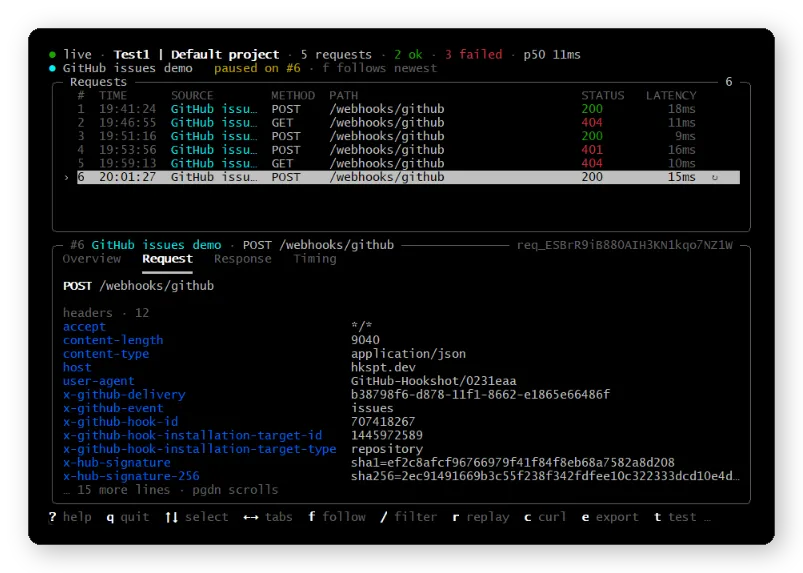
The other rows are the ping, issue #1 and two GET requests that I explain in the FAQ. The replay only runs on your machine, and the CLI says so in its overview: replays never change the delivery’s status in Hookspot. The dashboard still shows Failed 401 for issue #2. If you want Hookspot to record a successful attempt, click Retry on the delivery in the dashboard.
Step 9: Let Hookspot check the signature too
This step is optional. Hookspot has a GitHub provider preset that checks the signature before a request reaches your laptop. Open the route, go to Settings, choose GitHub as the Provider, turn on Verify GitHub signatures, paste the same secret into Webhook secret and click Save:
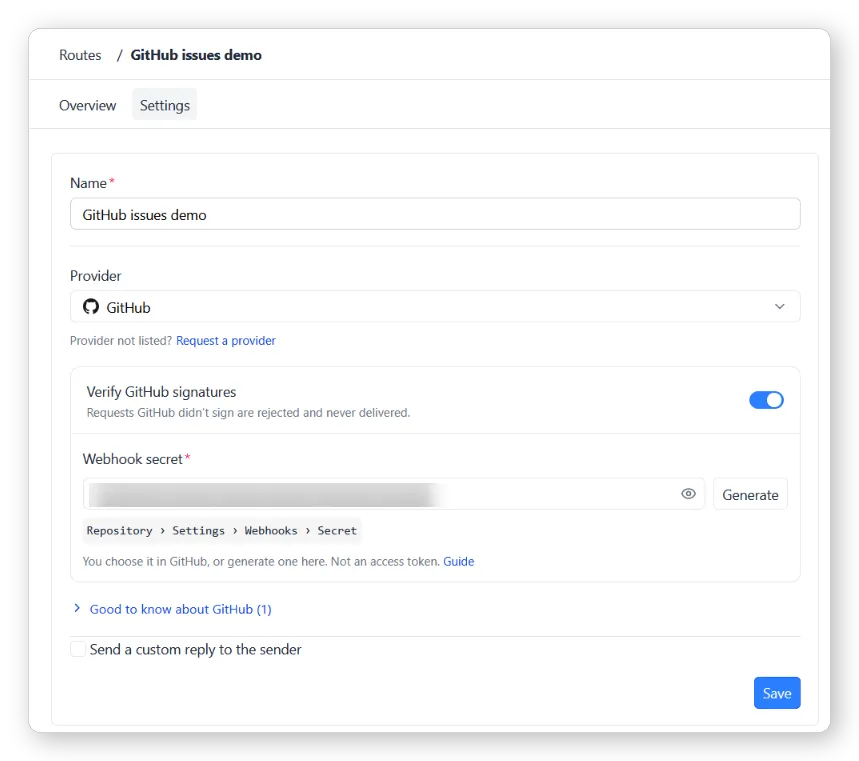
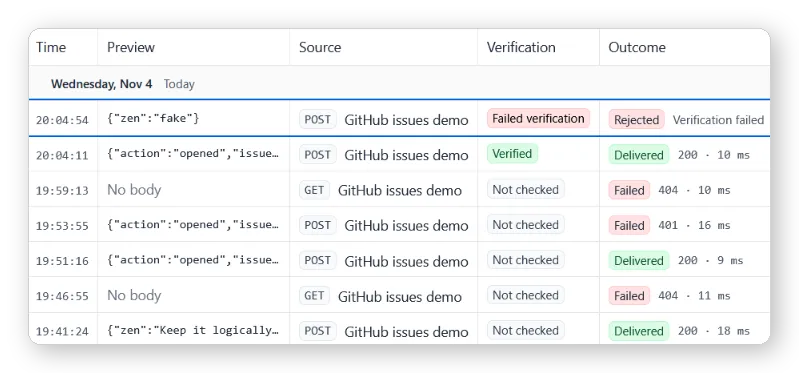
I opened a third issue. In Requests, it was marked Verified and Delivered with 200, and the receiver logged issues.opened #3. My app ran its own signature check on that request and it passed, so Hookspot forwarded the body and the X-Hub-Signature-256 header without changing them. Hookspot’s verify senders guide doesn’t mention this, so I only know it from this test.
Next I sent a fake GitHub request with curl from the third terminal, signed with nonsense:
export WEBHOOK_URL="$(cat ../github-webhook-url.txt)"curl -s -w "\nHTTP %{http_code}\n" -X POST \ -H "Content-Type: application/json" \ -H "X-GitHub-Event: ping" \ -H "X-Hub-Signature-256: sha256=0000" \ --data '{"zen":"fake"}' "$WEBHOOK_URL"Hookspot marked it Failed verification and Rejected, with the reason “GitHub · Signature invalid”, and didn’t send it anywhere. According to the verify senders guide, Hookspot answers a rejected request with 401 and never delivers it to your app:
Should the check live in Hookspot or in your app?
I’d keep it in the app. Once you deploy, GitHub posts straight to your server, and isValidSignature is the only check in the way. The Hookspot check helps while testing, because forged or unsigned requests to the Webhook URL stop there and never reach your laptop. With both on, a wrong secret in GitHub shows up as Rejected in Hookspot and a wrong secret in your environment as a 401 from your app, so you can tell which side to fix.
Before you use this with a real repository
The receiver is a starting point for local testing. A few things to sort out before it handles real events:
- Load the secret from an environment variable or a secret manager, as here, and never commit it. If it leaks, set a new one with Change secret in GitHub and update your app.
- GitHub expects a
2XXresponse within 10 seconds. Otherwise it closes the connection and records a failed delivery, according to its best practices. Slow work belongs in a queue, as described in the 200 OK article. - GitHub doesn’t redeliver failed deliveries on its own. You can redeliver them from Recent Deliveries, which lists the last three days. A redelivery keeps the same
X-GitHub-Deliveryvalue, so store that ID and skip deliveries you’ve already handled. - The receiver doesn’t limit the body size and only logs the events. Add those parts before you deploy it.
Next steps
How to Test Webhooks Locally with Node.js covers the basic setup and the replay diff with a simpler order handler. To keep a captured GitHub event as a test, see Turn a Captured Webhook into a Node.js Regression Test, and remove the signature headers from the export, or sign the fixture with a test secret, before you commit it. If GitHub sent events while your CLI was stopped, How to Recover Webhooks That Arrived While Your Laptop Was Off shows how to retry them. And if GitHub shows success but your app didn’t do its job, read Why a Webhook Returns 200 OK but Your App Still Fails.
FAQ
Why does GitHub show 200 when my app returned 401?
GitHub only talks to Hookspot, which answers 200 once the event is stored. Your app’s response is on the delivery in the dashboard and in the CLI’s Response tab.
Can I use localhost as the Payload URL?
No, GitHub refused to save the form when I tried. Give it a public URL such as your Hookspot Webhook URL and let the CLI forward requests to localhost.
Why did a GET request with no body fail with 404?
GitHub sends webhooks as POST requests. A GET with no body usually means someone opened the Webhook URL in a browser. Hookspot forwards it like any other request, and this receiver answers 404 to everything except POST /webhooks/github. Two of those showed up in my CLI list.
Should I check X-Hub-Signature or X-Hub-Signature-256?
Check X-Hub-Signature-256. The older X-Hub-Signature uses SHA-1, and GitHub only sends it for backward compatibility.
Does Hookspot retry when my app returns 401?
No. Hookspot doesn’t retry 4xx responses other than 408 and 429. Fix the secret, then replay the request with r in the CLI or click Retry in the dashboard.